
One of the key buzz words I hear a lot is root cause. Every company I have ever dealt with wants to find the root cause of a problem because ideally it is then easier to prevent or architect things so it would not happen again. But I often wonder how many times the root cause of a problem is often a symptom that is mistakenly taken for root cause. And I often wonder how companies and IT teams in general come to the root cause of problems when they have limited visibility.
To find true root cause you have to have visibility. And Finding the truth is hard to do without it. So often times root cause analysis is simply who had the best theory that most closely match’s the problem. With wire data it seems to me to be the closest thing to the truth I can find. If you see it on the wire then it most certainly happened. If you did not well that is another story.
So, based on this I want to walk through a scenario. That I have seen more times then I should have. And many times the root cause may have been attributed to the wrong thing.
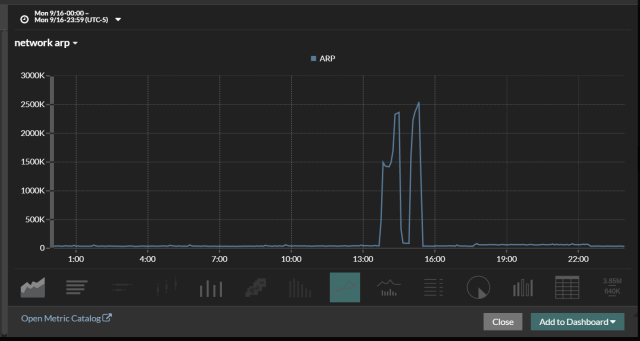
One afternoon a company suffers an outage. This outage was basically caused by network device with HA configured suddenly failing over to a different datacenter. But what caused the network device to fail or lose communication with it’s HA pair? Naturally the investigation begins and we start digging into as many tools to see what we can find. As we are digging in one of the analysts walks in saying he found the problem. Take a look at the first graph.
Below is a graph of ARP and low and behold there is your problem!!!! The application team is saying that an arp storm caused the outage and we have bad hardware. Arp storms are often caused by bad hardware. Or so that is what is often taught. Or maybe it is a common hypothesis when you do not have visibility into the environment. But what really caused the ARP storm???? And how would any company catch this that does not have visibility in to their wire data??? I have never found an ARP Log, there may be one but I do not know about it. So, what caused the ARP and how do we find the offender.
Cool thing is Revealx has the ability to drill down. We can look at the Client sending out the most arp requests. In this case it was a router that was sending all the ARP requests so why would this happen? Why would a router need to ARP so much was it failing? Is there bad code.
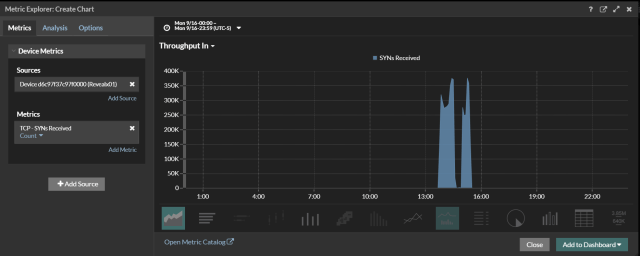
Since this was a router. We started looking at all the interfaces. Not the Layer 3 interfaces. But the layer 2 interfaces. What we found was that on one side we could see a Syn Scan taking place. The Scan was directed towards the 192.168.1.0\24 network. And was scanning all ports. The ARP storm was happening on the 192.168.1.0\24. As you can see from the second screen shot we could see the syn scan taking place.
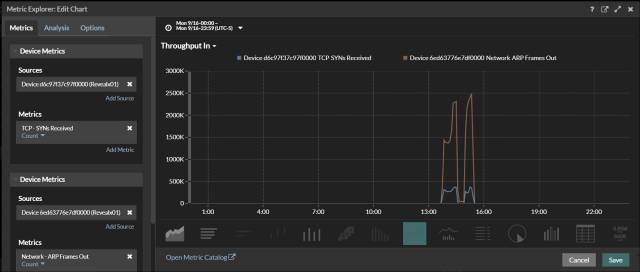
In the final screen shot we overlay the arp and the Syn Scan. You see the Syn Scan start and the ARP Storm start and stop at nearly the same time. So now we have a root cause. Or do we? Why would a Syn Scan Cause a device to lose communication?? That should be the real question. But that is for a different time as we are not here to discuss different vendor challenges.

 Mitch's Blog