
I have recently Joined Microsoft as a Premier Field Engineer. And wanted to let everyone know. I plan on continuing to blog. And hope I can do more of it as time permits.
-
Recent Posts
Archives
Categories
Meta
I have recently Joined Microsoft as a Premier Field Engineer. And wanted to let everyone know. I plan on continuing to blog. And hope I can do more of it as time permits.
Since this is one of the most common complaints I see I thought I would take some time to explain how I trouble shoot this. I will attempt to explain the trouble shooting methodology that I use and why it is affective as well.
First in order to trouble shoot we must understand where and when these errors or prompts can occur. This is not as complex as one might think but there are many variables that can come to play. Lets begin by explaining where certificates are used with in exchange 2010.
We will start by going discussing certificate errors.
If you pay attention when you assign certificates to Exchange 2010 CAS servers you will find there are only a couple of places that they are involved.
1 thing to note. Certificates do not play a role in RPC encryption this means that the CAS Array name is not required on the certificate. RPC uses it’s own encryption methodology. Now there is an RPC directory in IIS but that is for outlook anywhere (RPC over HTTPS). Once you know the above it is easy to start a process of elimination. First of all SMTP, POP3, UM and IMAP will not give you a certificate pop up on the screen they will simply fail and an error will be indicated. So we can eliminate these as the culprit rather quickly. So really that leaves IIS as the culprit for Certificate Pop ups. So then you might ask what services would cause this. I will list them in the order they are actually queried. Not now all of them will be queried on start up of the client.
NOTE: this is for both outlook 2007 and outlook 2010, The auto discovery query will happen even if the mailbox is on 2003, So the minute you put a 2007 or 2010 CAS in your environment. the clients will start this process (actually they do it even with out the CAS server in place however they just never receive an answer and go back to the configuration you have defined). All other query’s may happen at different times.
Those are the directory’s that can and most often cause the Certificate Popup. Often times this is caused by the certificate not matching the name that is being queried. What I see happen the most is people simply add the name to the certificate so the problem is fixed however this is really not the best idea. It can mean more expense and it can also make managing certificates and trouble shooting much harder to do.
I often am asked, why I ask some of the questions I ask during an interview. In some cases some people are not happy and feel that some of the questions are out of line, and some have even said there is no reason to Know these questions in day to day IT work.
One of the first questions I ask is “How does a client\PC find a domain controller”. So why is this important in IT, There are several pieces to this question. But first I know that the majority of IT people can’t answer this question. How do I know this you might ask? well I have interviewed 100’s of people and have found that very few if any could actually answer this questions. often I am looking to see how they respond when they do not know the answer. Most would think that I am looking for the person to say “I do not know” but what I am really looking for is someone to try to walk through how they think it works.
An answer like this would usually sound like, “you know I am not sure of the answer but I based on the information I have right now. I think it works like this” and then attempt to walk through what they think. Interestingly enough the most common answer is “I do not know” If I say something like “that is fine but try to think it through and tell me how you think it might work” I still often get “I do not know”
Now why would knowing the answer be important in a Microsoft IT world. Since all access to all resources is based on authentication and authorization which comes from Active Directory. it is often important to be able to trouble shoot these types of problems. And funny things is one of the most common problems I hear from our customers is “Logging in takes to long” or “Authentication is slow” how can you trouble shoot these types of problems if you do not even understand how a client finds a Domain controller. The first step in authentication is finding what you need to authenticate against.
At the same time how can you design sites and services in active directory. if you do not understand how the client\PC finds a DC in those sites?
This is just one of many questions I ask during an interview and an example as to why it is important to actually understand why and how things work.
Aren’t they the Same thing? Well not really, matter of fact they are not even closely related to each other. One DNS round robin is handled by the server. where DNS load Balancing is a function of the client. So what does that mean? And why should you care? With DNS round Robin you place multiple A records with the same name pointed to different IP’s I.E
So the server will hand out or “round robin” the entry’s i.e. 1 will be delivered to the client first, then the next client that makes a request will receive 2. And the 3rd client will receive entry number 3. The server continues to round robin this all the time. This is simply a way of using DNS to send traffic to different IP’s however there is not true way to load balance the traffic if one server is offline. Traffic will still be directed to that server. Some people have referred to this as the Poor Man’s Load Balancing. but as you can see it does not really guarantee true load balancing. Nor does it have any knowledge if the server does not respond for any period of time.
So with true DNS load Balancing the client is actually what determines how and when to use each entry. The client is actually smart in that it can determine a server is not responding and temporarily remove it from the list to try for a period of time. This time period is dependent on how the client is programmed. The client actually requests all entries for the DNS name it is querying if the DNS servers supports EDNS then it will respond with all entries for the requested Name. The client then uses an algorithm to determine which record to try to connect to first. So what clients actually use DNS load balancing.
Exchange Hub transports
Lync Clients
Even PC’s do when trying to contact a Domain Controller (to some extent)
True DNS Load Balancing comes from Enhanced DNS specifications but parts of it have been being used for some time.
It is important to understand the differences and to understand that this is not new technology. this has been working for some time and other systems use different pieces of it. It is a pretty solid solution.
IT MAY NOT WORK THE WAY YOU THINK IT SHOULD
So for years with windows 2003 it was very common to add additional IP’s to a NIC. This was very common with Web servers. If you wanted to host multiple sites with different SSL requirements it was very common. many times one a web server you can just use host headers for multiple websites with out SSL requirements. But in those odd cases mulitiple IP’s were used on the same nic.
We did it with OCS on the edge server. And many other servers. With Exchange 2010 it is now an option to deploy OWA as part of a Second IIS Web directory to maintain FBA internally when using TMG. This would require a Second IP on the NIC for this to work properly.
However we have found out some new information. it is not really new. it has been this way since 2008 released. Both Joe Dix, and Shawn Kirkpatrick have run into this. And I want to thank them for providing me the information for this blog.
here is the article that explains the behavior
In windows 2003 if you added a Second IP it always used the Primary IP (first one in the list) as the primary IP. if an application called for ANY ip to be used it would always use the primary or first one in the list.
In windows 2008 this all Changed, Now it uses an algorithm to determine which IP to use. This means that you may have strange behavior where traffic comes from the wrong IP. or at least what you think is the wrong IP.
Rule 1 Prefer same address (applies)
Rule 2 Prefer appropriate scope (applies)
Rule 3 Avoid deprecated addresses (applies)
Rule 4 – Prefer home addresses – does not apply to IP v4
Rule 5 Prefer outgoing Interfaces (applies)
Rule 6 Prefer matching label – does not apply to IP v4
Rule 7 Prefer public addresses – does not apply to IP v4
Rule 8a: Use longest matching prefix with the next hop IP address. (not in RFC!)
“If CommonPrefixLen(SA, D) > CommonPrefixLen(SB, D), then prefer SA. Similarly, if
CommonPrefixLen(SB, D) > CommonPrefixLen(SA, D), then prefer SB. ”
This says that the IP with the most high order bits that match the destination of
the next hop will be used.
Note: Rule 8 – Use longest matching Prefix is similar to rule 8a except the match
is with the destination IP address rather than the next hop IP address.
So let me give you an Example
1 CAS\HT server with a second website added because TMG is in place and Customer wants FBA and all traffic to stay internal and is not willing to use the inside interface on TMG for internal OWA traffic.
CAS 1 NIC
192.168.12.5
192.168.12.6
gateway 192.168.12.1
In this case all seems to work just fine. HT will send email out via the .5 address, web traffic will use what is specified in IIS.
So what happens if my config is this
CAS 1 NIC
192.168.12.5
192.168.12.6
Gateway 192.168.12.254
in this case the HT will use 192.168.12.6 as the sending ip for SMTP based on the above algorithm. Which is not what most people would expect. There are a lot more variables that can affect this if they have a spam filter that is on the same subnet as the servers which would make it the next hop instead of the gateway, Depending on it’s IP then this could happen differently.
so how do you stop this behavior. SkipAsSource
you have to apply one of the following patch’s depending on which version of 2008 you are working with.
then you have to add the Second IP with NETSH with the skipassource flag set. This can only be set when you add the IP. So if it is already there then you have to remove it and use NETSH to add it with the flag set. See below.
There is a new twist in the source IP selection process.
Note: There are two variants of the below mentioned hotfix; one for Windows Vista / Windows Server 2008 and one for Windows 7 / Windows Server 2008 R2.
975808 All IP addresses are registered on the DNS servers when the IP addresses are assigned to one network adapter on a computer that is running Windows Server 2008 SP2 or Windows Vista SP2
2386184 IP addresses are still registered on the DNS servers even if the IP addresses are not used for outgoing traffic on a computer that is running Windows 7 or Windows Server 2008 R2
After you install the hotfix discussed above, you can create IP version 4 (IPv4) addresses or IP version 6 (IPv6) addresses by using the netsh command together with the new “skipassource” flag. By using this flag, the added new addresses are not used for outgoing packets unless explicitly set for use by outgoing packets.
Note: This command only works when adding an address you can’t apply it to an address already on the machine. You would need to remove it and add it again.
Recently I spent some time trouble shooting why my wife’s Hotmail would not work on here Android phone. As this article states it should work.
http://www.windowslivehelp.com/solution.aspx?solutionid=f49bdf1f-8bb9-47e4-9633-e3a6ba15e2f8
However I kept receiving an authentication error, and it seemed like the password or username was incorrect. but I could log onto the web based Hotmail with no problem. Interestingly I could try to authenticate with the android application a hundred times and it would not lock me out of Hotmail.
What a conundrum I kept trying for a while then remember something. some applications on android devices have a problem with long passwords. Hotmail supports long and complex passwords but many applications are still being written to only accept 14 characters or less.
My password I was using was 17 characters, Low and behold I change it to a 14 character password and BAM all starts to sync.
I wish programmers would learn long passwords are better. hopefully some day they will.
Welcome to WordPress.com. This is your first post. Edit or delete it and start blogging!
I am seeing a lot of posts that have some interesting comments about licensing. However many are not referencing Microsoft’s own how to buy documentation.
http://www.microsoft.com/exchange/2010/en/us/licensing.aspx
This provides pretty solid information about what is needed for Database Availability or as some people might call it. High availability. I have seen some posts around Exchange 2010 standard addition HA. Which really there never was such a thing. There was LCR which is now gone. However now you can use Standard edition of exchange loaded on a windows 2008 Enterprise server and start a Database Availability group better known as a DAG.
I have seen many discussions around 2 server HA in small environments. and yes this is possible. however in order to do it. You must have the following.
the hardware is not as big a deal as it used to be. the hardware can be dissimilar however it is at least recommended that both machines have 2 nics. The servers do have to be 64 bit.
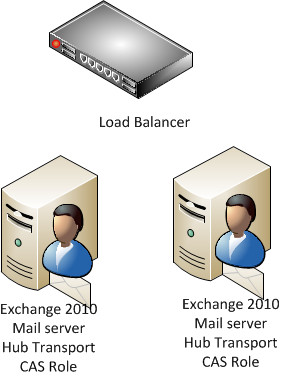
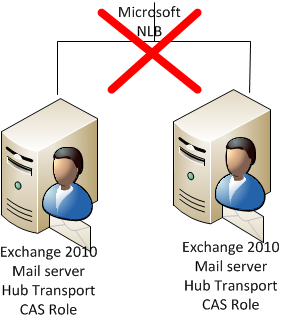
Now you will find some documentation that states a load balanced CAS server can not be on a Mailbox role with a DAG. The specific on that is that you cannot use MICROSOFT NETWORK LOAD BALANCING with the CAS roles installed on a Server that has DAG implemented. so in this case you have to implement either hardware load balancing or use ISA load balancing.
Hope that helps
It is awesome that Microsoft has put archiving into exchange. However it is interesting how much buzz, and how many questions there are around it. In the past several months I have been fielding questions about archiving and many of them are coming from customers that have had an archiving vendor in to discuss the topic with them.
Because of this I really wanted to do some research about Archiving and the reasons to archive and then try to figure out what all the buzz is about. I will openly say I am a fan of Microsoft solutions simply because in many cases I find I can do more with less. And administratively my headaches are less when I do not have to introduce in as many 3rd party solutions. Microsoft does not always meet the need 100% but many times they meet 80% of what is needed. And in email archiving I think they have met that requirement. Here is why.
Generally when i talk with customers about archiving they have several reasons for doing it.
Legal Reasons (where Exchange is at)
First I want to make it clear I am not a lawyer. So I could be wrong on any of this. However one of the points being used against exchange 2010 archiving is BATES Numbering. Now I am not completely sure what this is. but my understanding is that is a numbering scheme for legal discovery.
Some archive products have this and if you are in court a lot with discovery cases then this may be a pretty solid requirement. However not all archive products have it either. so if you only reason for archiving is legal purposes be sure you do plenty of research on this and make sure you legal team has input. from what I can find so far Exchange does not use or implement Bates Numbering with in it’s archive solution. But I am betting at some point a vendor will come along that will do just that.
Compliance Reasons
I would argue that Microsoft has a decent solution here for medium business. Often times they are looking for something that they can just search the database when someone complains of an HR issue. or they are looking for something that will help them restrict communications between different resources. I believe Microsoft is closer in this arena then most people think. However I still have more digging to do. and will start to write some more technical blogs around this later
Exchange Performance and Database Size
This is where i want to dig in a little more. simply because I think many organizations have this problem and are concerned about it. and are looking at archive solutions just for this. I would suggest that organizations be very careful when reviewing archive solutions for this purpose.
What I have found is that many of them will take up more space then the exchange Databases and the disk requirements are often times greater then exchange. This does not make any sense to me since it is an archive solution. With some of the new features of Exchange 2010 you can archive with in Exchange.
Yes to do Exchange Archive you enable a archiving for a user and it makes a new mailbox with in the same database. Yes that seems a little strange and immediately people start to say well that does not do anything for me. And yes if you follow the old Exchange 2003 methodology you are correct it does nothing for you.
However if you start to really read and review what they have done with Exchange 2010 as a whole it starts to make sense. Yes I am seeing vendors of archive products fail to tell people the whole story about Exchange 2010.
In order to understand why they are creating archive this way you need to understand that Exchange has 70% less I\O requirements then exchange 2003. this and some other neat features enables Exchange Databases to run on SATA Disks (yes that is the bottom of tiered storage) So now with less I\O requirements my databases can grow much larger and still maintain some outstanding performance.
But this brings up another question. Most Exchange Admins I know do not like to have their databases grow over 100 GB even in Exchange 2007. This was not really because of performance but because of Backup and Recovery. So now i am telling you let the database grow. Now Microsoft is saying realistically you can let them grow to 2 TB. WOW that is huge but now think of the backup and recovery ramifications.
That is why Microsoft is looking at Backup-less Exchange as a possibility now. With the new DAG you can actually set databases to be LAGGED. this means that you could set a database copy to be 24 hours to 2 weeks behind the actual active copy. And you can have up to 16 databases. As well as your backup software could actually backup off the passive node or even one of the lagged DB’s. This means my backup windows never close. So it would be possible to do a weekly backup and keep 6 days on disk. and each day litterly be able to start up fairly quickly on its own with out you having to restore it. Amazing.
So all this together now starts to make Microsoft’s methodology of Archiving make more sense. Ask your archive vendors how do they handle HA between DR sites. How about backing it all up. As their Data Store grows it also becomes difficult to backup and recover.
I know there is a ton more and I have only scratched the surface on this. but I have written a very long blog post that many will not read. so I am going to stop now.
have a great day and hope this helps someone.
 Mitch's Blog