
DNS is a set it and forget it application. And many administrators do not realize the impact DNS has in their environment. Most environments I have been in have never seemed to even care about how it was architected or what is really happening with their DNS. And yet DNS is often the cause of many outages, and many problems seen and unseen. So here is a list of all the things I think are important to watch for:
- Quantity of DNS queries
- Types of Queries
- DNS Errors
- DNS time outs
- DNS Names being queried
- TTL in the Response
- Multiple answers in the DNS response
- DNS Geo load balancing,
So why should I even care about any of the above. Well let me go through each of them and list some possible problems with them.
-
Quantity of DNS Queries
-
Overloading a DNS server
- Can cause time outs
- Hiding Traffic through DNS Tunneling as it leaves your environment
- Slowing down applications because TTL is to low and 1000’s of query’s are being made for an ip that remains static. Or Times out because of the overwhelming amount of queries caused by low TTL.
-
-
Types of Queries
- DNS Tunneling
- Misconfigured DNS
- Easy way to see what and how some applications work (i.e. auto configuration stuff)
-
DNS Errors
- Errors are normal. NXDOMAIN is normal. But why would I have so many and what is by baseline
- Look for important names
- May be because someone is using Host name, And not FQDN. Could speed the process up by milliseconds.
-
Do I have multiple DNS suffix search orders?
- Does my dns query have to go through 5 DNS suffix’s to get a final answer?
- Is this good or bad. (in my opinion it is bad since it slows things down just a ms or 2)
-
DNS Time outs
- When a client has to wait for DNS Time outs it means the application is waiting.
- Usually this means that DNS will try again by hitting the secondary DNS server
- Long enough times outs can me the application times out with an arbitrary network error.
-
DNS Names being queried.
- Odd names can be an indicator of a virus.
- Are your applications using FQDN or host name.
- Indicator of Bitcoin mining
- There is a lot more. But always a good idea to see what is being queried and Ask your self why.
-
TTL in the response
-
This is important from the aspect that many people thing DNS Geo load balancing is awesome.
- However when you have 10000 clients that query that service often and their time to live is 5 min or even 0. It can quickly overload a DNS server.
- When companies setup DNS Geo Load balancing and set the record to 5 min or 0 it is possible to have an application be talking to 2 totally different ip’s under some circumstances.
-
So those weird times your app talks to the vendor or customer just fine, but then drops off for a bit. Then comes back. Hmmm check DNS see if they were hitting a different IP address during that time frame.
- I see this often. When you do an NSLOOKUP for x.domain.com and it returns ip xxx.xxx.xxx.xxx and you test and all is good. But 10 min ago the app team says it was not. Then they say oh it working now what did you do? So you go about your business they call back 5 days later and say do that thing again we are broke. And you start the whole process over. But what you do not realize is that for 10 min x.domain.com was going to yyyy.yyyy.yyyy.yyyy
- Seeing this also helps you on misconfigs.
- On static IP’s you can change it to be longer if you see the same request often.
- Helps you see when changes are made.
-
-
Multiple IP’s in the DNS Response
- I have seen responses with as many as 7-10 IP’s in the same response with different TTL’s
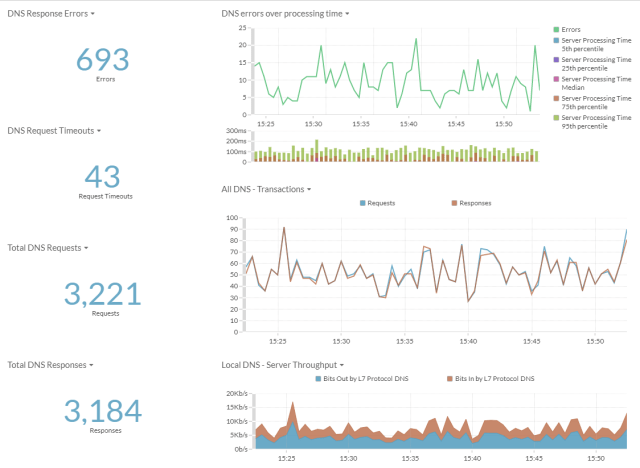
This is just a list of some of the reasons I would want to monitor my DNS. I have found multiple times where DNS was the cause of performance issues. As well as the cause of intermittent errors. But it is very hard to tell when this is happening. DNS logging does not always help since it can be overwhelming trying to search through all the logs. However with Extrahop. I have been able visualize this type of data quickly. And easily.
Below is a sampling of the graphs and metrics in a basic dashboard from extrahop.

 Mitch's Blog
Aweesome blog you have here