
One questions I receive often is around Mailbox Replication in Exchange 2010. And at first I didn’t think I really needed to write this post. Why you might ask? Well like many of you I initially thought well you only will use it once in a while. Say when you are actually migrating your users from an older version of Exchange to a newer.
But as I thought about this and as more questions came in. I found that this is an important topic. Not only because many people are still in the process of migrating to Exchange 2010. But many organizations may spread the load of users between databases once in a while. and or move users between databases for one reason or another.
And since you can move a user with out much impact to them. As well as the fact that offline defrag is not recommended and moving user to a new database is the best method for this. I am seeing more and more people moving users around between servers then ever before. This means MRS plays a very heavy role in moving those users.
There are several great articles that explain MRS and what it is doing. http://technet.microsoft.com/en-us/library/dd298174.aspx. As well as some that explain how to throttle MRS http://technet.microsoft.com/en-us/library/ff963524.aspx. However none of them have really taken the time to explain how making adjustments affects the MRS and how to spread the load between CAS servers to make this more efficient.
There are several key settings that I usually play with when trying to optimize MRS configurations.
They are:
MaxActiveMovesPerSourceMDB = “5”
MaxActiveMovesPerTargetMDB = “2”
MaxActiveMovesPerSourceServer = “50”
MaxActiveMovesPerTargetServer = “5”
MaxTotalMovesPerMRS = “100”
The file is located under Program files\Microsoft\Exchange Server\V14\Bin\msexchangeMailboxReplication.exe.config
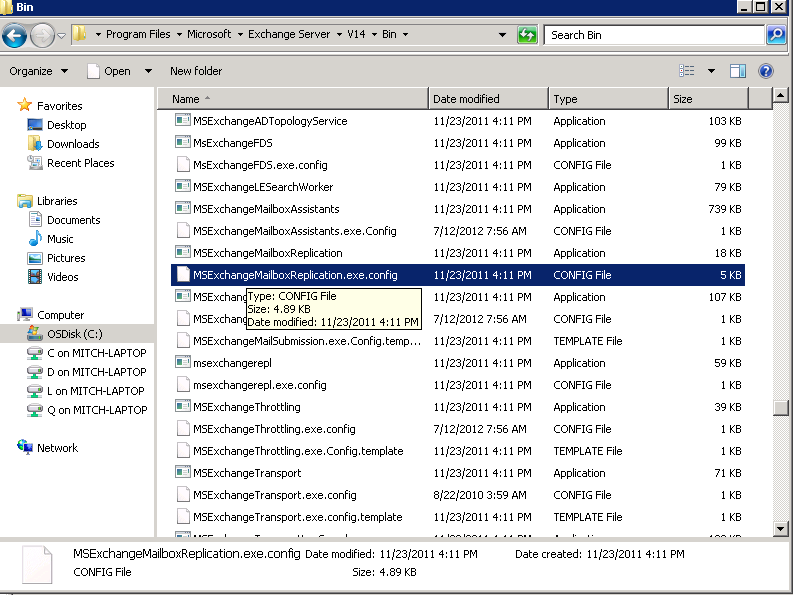
You can open the file with notepad the settings you need to change are under MRSConfiguration. Many people often mistakenly change the settings under “Mailbox Replication Service configuration” The one in Yellow is the one you do not want to change.
<!– Mailbox Replication Service configuration
Setting Name – Default, MinValue, MaxValue
MaxRetries – 60, 0, 1000
MaxCleanupRetries – 5, 0, 100
RetryDelay – 00:00:30, 00:00:10, 00:30:00
MaxMoveHistoryLength – 2, 0, 100
MaxActiveMovesPerSourceMDB – 5, 0, 100
MaxActiveMovesPerTargetMDB – 2, 0, 100
MaxActiveMovesPerSourceServer – 50, 0, 1000
MaxActiveMovesPerTargetServer – 5, 0, 1000
MaxTotalMovesPerMRS – 100, 0, 1024
FullScanMoveJobsPollingPeriod – 00:10:00, 00:03:00, 1.00:00:00
MinimumTimeBeforePickingJobsFromSameDatabase – 00:00:04, 00:00:00, 01:00:00
ServerCountsNotOlderThan – 00:10:00, 00:00:00, 01:00:00
MRSAbandonedMoveJobDetectionTime – 01:00:00, 01:00:00, 12:00:00
BackoffIntervalForProxyConnectionLimitReached – 00:30:00, 00:00:30, 1.00:00:00
DataGuaranteeCheckPeriod – 00:00:10, 00:00:01, 02:00:00
DataGuaranteeTimeout = 00:30:00, 00:00:00, 12:00:00
DataGuaranteeLogRollDelay = 00:01:00, 00:00:00, 12:00:00
EnableDataGuaranteeCheck = false, false, true
DisableMrsProxyCompression = false, false, true
DisableMrsProxyBuffering = false, false, true
MinBatchSize = 100, 2, 1000
MinBatchSizeKB = 256, 16, 16384
–>
<MRSConfiguration
MaxRetries = “60”
MaxCleanupRetries = “5”
MaxStallRetryPeriod = “00:15:00”
RetryDelay = “00:00:30”
MaxMoveHistoryLength = “2”
MaxActiveMovesPerSourceMDB = “5”
MaxActiveMovesPerTargetMDB = “2”
MaxActiveMovesPerSourceServer = “50”
MaxActiveMovesPerTargetServer = “5”
MaxTotalMovesPerMRS = “100”
FullScanMoveJobsPollingPeriod = “00:10:00”
MinimumTimeBeforePickingJobsFromSameDatabase = “00:00:04”
ServerCountsNotOlderThan = “00:10:00”
MRSAbandonedMoveJobDetectionTime = “01:00:00”
BackoffIntervalForProxyConnectionLimitReached = “00:30:00”
DataGuaranteeCheckPeriod = “00:00:10”
DataGuaranteeTimeout = “00:30:00”
DataGuaranteeLogRollDelay = “00:01:00”
EnableDataGuaranteeCheck = “true”
DisableMrsProxyCompression = “false”
DisableMrsProxyBuffering = “false”
MinBatchSize = “100”
MinBatchSizeKB = “256” />
</configuration>
So let me get to the meat of this blog. I want to try to give you some examples of the settings and explain how and why they are setup. But first I have to make a couple of things clear. We have to understand a few things about nomenclature as the military calls it or just definitions.
- MaxActiveMovesPerSourceMDB = “5” This Is specific to a source database pretty obvious
- MaxActiveMovesPerTargetMDB = “2” Again this is self explanatory. it is how many moves will you be able to send to the target Database
- MaxActiveMovesPerSourceServer = “50” this is how many moves that you can do from a source server
- MaxActiveMovesPerTargetServer = “5” This is how many moves you can do per target server. Now here is the interesting part we are specifically talking MBX servers. So if you have CAS and MBX separated and have 2 CAS but 4 MBX then you have 4 target servers. This applys to sourceserver as well.
- MaxTotalMovesPerMRS = “100” this is how many total moves a single MRS instance (meaning CAS server)
Scenario
Lets say you have 2 Exchange 2003 servers each servers has 5 databases on it. You are moving to an environment that has 3 CAS servers with 4 MBX servers. Each with 5 DB on it. (yes I know Multi-role is the way to go. But I wanted to use this as an example). My desire would be to have 5 mailboxes move from each database. and take advantage of all CAS servers to move the users.
MaxActiveMovesPerSourceMDB = “5”
MaxActiveMovesPerTargetMDB = “5”
MaxActiveMovesPerSourceServer = “25”
MaxActiveMovesPerTargetServer = “25”
MaxTotalMovesPerMRS = “20”
Now the question I have for you is will I actually move 100 at a time. the answer is no. I have 25 per source server and only have 3 source servers so the max I would ever hit is 75. If I had left the MaxTotalMovesPerMRS at 100 then only 1 CAS server would try to handle all the moves so it would appear that things are not distributing correctly. Will it always work out to distribute it evenly? Well you have to believe MRS is smart enough to always keep it going.
OK so how smart is MRS. I always had this Idea in my head that MRS was really intelligent and would dynamically pick users from here there and every where to try to move as many as it can.
Well it is not that smart. Basically if I have 50 users distributed evenly across 5 Databases. What will happen is MRS will make a list of users for each database (not sure about how it orders that list yet). Then it will start trying to move those users. There is no intelligence to try to determine which ones are bigger than the other or who should move first. it just makes the list. So as each database finishes it’s list then that will decrement the number being moved so in larger moves it will not always be a perfect distribution. you should expect it to be a close to even distribution to start but usually very quickly things start to vary.
The key is keeping it as distributed across the CAS servers.
Hope this helps make someone’s job easier. Be sure to check out the MSPFE Blog http://blogs.technet.com/b/mspfe/ there are a ton of good blogs with great information. Remember to take advantage of your Premier agreement and have a PFE come on site to help with your needs.

 Mitch's Blog