
So one of the Questions I receive most often is around how do I cleanup Peoples mailboxes for them. In Exchange 2003 it was possible to setup a recipient policy really it was a Mailbox policy but because it is under the recipient policy tab some people still call it a recipient policy.
There have been lots of article written about how MRM works. But I want to cover some of the gotcha’s and how to control it. First thing to realize as this runs all the time now. After SP1 of Exchange 2010 it will run And the Schedule does not affect much of anything. The 2 settings that do are message ManagedFolderWorkCycle, and ManagedfolderworkCycleCheckpoint. I will go more into how to set these later.
One of the problems I have seen is people implementing MRM policys all at once and they end up having sort of a Storm with in the system because of the amount of traffic it generates. You have to think about what will happen when you implement this.
potentially you could have:
- Increased Replication traffic
- Increased traffic from the clients and the re-download their Cache remember you may be removing lots of email depending on the situation
Ideally MRM is smart enough to throttle the process so you should not see it cripple your server’s processor or RAM. however because of increased replication and client downloads you may see the environment come to it’s knee’s. So remember always plan your implementation out to happen slowly until you have figured out what the load will be.
If by chance you get into a situation where you have a storm created you can do a couple of things first would be to run the Set-mailbox command and $null the workcycle. This can be done by running the following command for each MBX server.
set-mailboxserver -managedfolderassistantschedule:$null managedfolderworkcycle:$null
The Managefolderassistantschedule does not really do anything the workcycle stops the process from running so you can at least stop the storm from being worse. Once you have done this. Then you need to figure out how to clean up from this. Remember all mailboxes probably were tagged and just removing the policy will still mean you have some mail to process through that still has tags. So when you set the workcycle back to 1 your storm will start again. so how do you clean this up.
First you can do this by creating a new policy and not putting any tags in it.
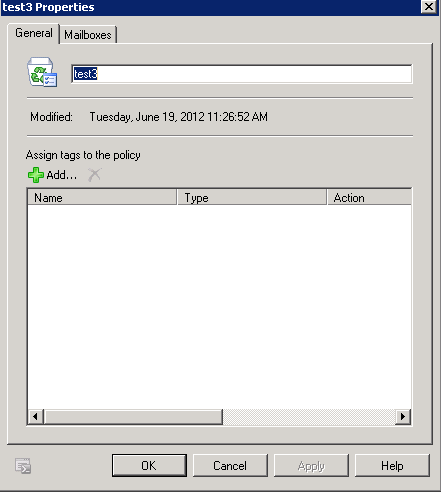
In my testing you apply this then run Start-managedfolderassistant and it will remove the tags. I will still do this on small groups of users because it may cause some additional traffic. This will put you back to where you started with No TAGS and really no policy. Once you have done the manual process you can turn back on the managefolderworkcycle. Be forwarned this starts immediately so if you have not cleaned every thing up it may happen again.
Another option would be to run the Start-Managefolderassistant on groups of mailboxes until you are caught up. however if it takes a while when you are done you may be behind again and may have a lot of tags to process when you turn the managedfolderworkcycle back on.
Hope this helps someone.

 Mitch's Blog